Matt Frankel's Blog


0001. Hello World

21st June 2024 - 9:30am | ~3min read

Introduction
Personal

I’ve always had a passion for computers and technology. From teaching myself photoshop, building my first gaming computer to coding very basic websites in my younger years – I had a burning curiosity.

Over the years I let this passion burn out and be replaced by the pursuit of false pleasures void of any meaning. But now as I reach the other side of adolescence and feel like I’m finally entering adulthood I want to try and recapture the excitement I had as a child, being able to build and create my imagination onto a screen.

It helps that the job I’m working at isn’t satisfying my needs to learn and grow, so I will be using this blog and a few other endeavors to teach myself I.T to the point that I am able to change industries into tech. My goal is to change industry from my current occupation of mining & construction work into working with computers within 2 years

I’ve decided that the best place to start would be in front-end web development as I already understand how the language functions from my experience many years ago. I decided that the oldEdzJohnson YouTube videos from a decade ago were no longer going to cut it for my ambitions.

I typed myself a list of learning objectives, they were as follows;
- HTML
- CSS
- JavaScript
- Networking
- Python
- PHP
- Linux

I think ultimately I would like to not only have a strong base of knowledge in programming and web-development, but ultimately become qualified through CompTIA A+, Network+, CCNA and a few other accreditations that I know to be popular within the industry. I may be behind the times, but I vow to catch up.

I ‘enrolled’ into a learning program with w3schools as they seem to offer education on nearly every language there is and have been around for a very long time. I paid for a membership and have been tracking my progress in the HTML lessons. I’m approximately 50% of the way through.

I created this website to hopefully implement some of the things I am learning and improve upon it over time. I think the best way to learn is by doing it.

So if somehow you have stumbled upon this blog, I hope you come back over time and see the progression made not only in the site itself, the content I’m posting but also in the progress made in my learning endeavor.
0002. Learn by doing

22nd June 2024 - 3:55pm | ~4min read

Learning
HTML/CSS

I’ve always been a big believer of diving headfirst into something you want to learn and picking the rest up as you go. Some may call this ‘winging it’, but I think it is the best approach to getting things done.

I could spend 3 months researching web-development trying to grasp what the best way to code is – or I could nosedive into my goals and be forced to learn as issues come along the way.

Even in the short time I’ve been creating this website, I’ve had countless issues and roadblocks arise in its development.

From the purchase of my domain names and the hosting of this website. I first went with Squarespace on 2 of my domains, only to find that the access to the back end was not what I thought I was going to get – or if it is, the information on how to get it seems murky even from their support workers.

I decided after comparison with this website, GoDaddy would be a better option for me and what I’m trying to achieve.

This goes further than webhosting and domains though, whilst creating this blog I’ve run into a few issues. Thank God for stackoverflow. I had an issue with my navigation adding a random ‘.’ At the top right corner of this webpage – turns out it was because my navigation was in a list (what navigation you may ask? My singular Contact button), and I hadn’t added the ‘list-style: none;’ property in CSS – which further led me to question, why am I wrapping my singular link in a list.

I also saw some code today that featured a ‘>’ to select a certain attribute of a class. Which has been great and allow me to fix some of my positioning errors I was also experiencing with my singular list style contact button.

I often wonder, is it better to go completely blind with no knowledge? Or do you still need a framework for learning? I ask because whilst I use w3 – it completely depends on my end result of what I’m seeking to learn. I can learn about every aspect of HTML & CSS but never use it, and then maybe one day if I do require the knowledge I will likely have to revisit the subject and start over.

I think for now I will maintain my studies through w3 but it seems the further in I go with my education I get sidetracked on other projects I want to learn, and instead of spending my time learning through w3 I’m sourcing other platforms to try and skip to the part I actually want to use.

A recent example is the ‘Read more’ button I just added to the website. I definitely had to rip the code from w3’s example – I can take no credit for it at all except the CSS styling – which mind you isn’t overly complex. Despite my copy paste coding antics, I’ve run into an issue where any addition of the read more button on a second article (like this one) will open post no.1 document. I know how I can fix this, but I think there has to be a neater way to achieve what I want. I could name every single blog post with its own unique class or ID, and have every single button open the corresponding article – but I ponder if there is any other way to make it more efficiently.

While I do appreciate w3schools and other more formal formats of learning for allowing me to get to a point where I’m ready for a deep-dive I think if you have a very specific goal in mind of what you want to create, and you’re excited to do so – why wait for the pieces of information you need to fall in line? I’m going to continue using w3 and progressing through my lessons – but I also will not deter myself from seeking as I go and finding solutions for my problems as they arise in real time.


0003. CSS Padding vs Margin

24th June 2024 - 5:55pm | ~5min read

Learning
CSS
Example

As a beginner in CSS I think this article will help you (and me) become a better developer. When styling with CSS (Cascading style sheets) you will soon learn that to position your html elements you’re going to use the ‘padding and margin’ properties respectively.

But what are these properties and how do they work?

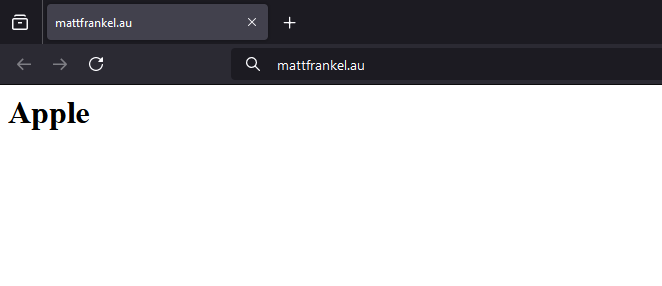
In CSS, you might have some text that you want to display in a much nicer way. Let’s say you’ve got the following html element.

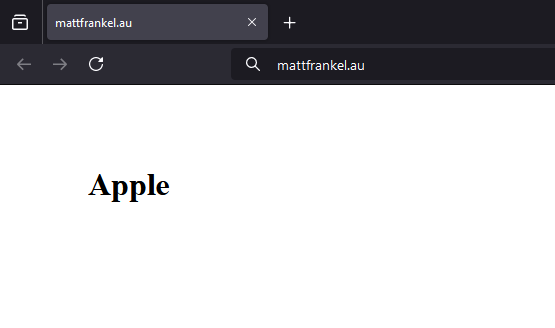
<h1>Apple</h1>

If you were to load up this element in your typical browser with the additional supporting framework code (ie- body and head elements), it would look something like this:

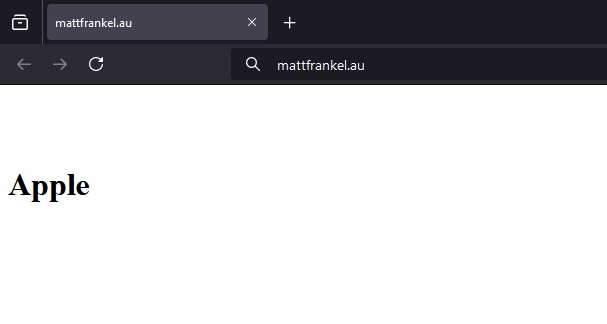
Now let’s suppose you want it positioned with more spacing between the top of the web-page, you can achieve this with the CSS margin element.

<h1 style=”margin-top:5rem;”>Apple</h1>

This will give you the following effect,

You can do the same using margin-right, margin-left, margin-bottom or margin properties. Using only the margin property will add space on all sides. You can also replace rem with px, a % or another unit of digital measurement.

Let’s say we wanted a neat way to have it 5rem from the top and 5rem from the left, using only the margin tag.

When a margin property has four values, it will place them in the following order
- margin-top
- margin-right
- margin-bottom
- margin-left 

<h1 style="margin: 5rem 0 0 5rem;">Apple</h1>

So in our example 5rem 0 0 5rem we are directing our margin to be 5rem on the top, and 5rem on the left. You can do the same with the padding value.

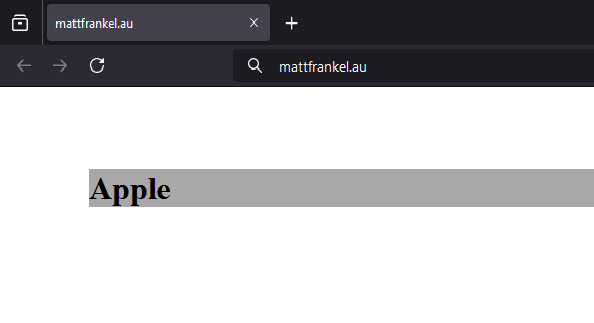
But what is the padding value? Let’s add a background color to our h1 tag to make it easier to visualize.

<h1 style="margin: 5rem 0 0 5rem; background-color: #A8A8A8;">Apple</h1>

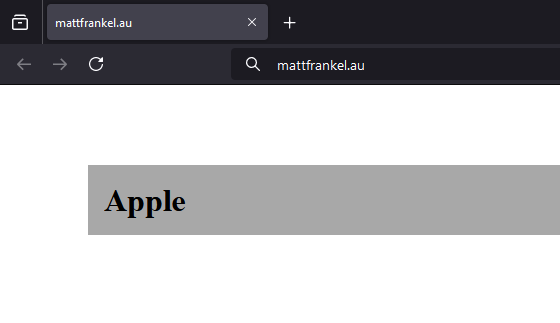
Now, notice how our gray element is touching the bottom of our text. Let’s change that. while maintaining our margin property, add padding:1rem to the style as follows.

<h1 style="margin: 5rem 0 0 5rem; background-color: #A8A8A8; padding: 1rem;">Apple</h1>

As you can see, we have now added some padding to our h1 element. Remember that when we only provide 1 value in a padding element it will occur on all sides. If we were to have the four elements, we could dictate the exact amount on each side by adjusting the values.>

Margins and padding in CSS are often confused. Sometimes you will accidentally use one instead of the other and wonder why the code is not functioning as you intend. It is important to make sure that you are not confusing them with each other. When possible, it is a good habit to write your code with a singular padding and margin property consisting of the four values.

I hope this has given you a better understanding of margins and padding in CSS. As we can see, margins will dictate the space between our element and anything else on the webpage. Like an outside area. Whereas our padding will still add space between our item and the other elements, but it functions more as an inside property.


0004. HTML Certified

26th June 2024 - 12:45am | ~3min read

Learning
HTML/CSS

I recently took the w3Schools HTML exam and passed. I was given 2 attempts, but I succeeded on my first.

It will accept my highest score and I did not score 100% so maybe in the future I will re-attempt to try and ace it.

I enjoy the fact that I now have a certificate from them, but after paying for the exam and seeing the conditions in which you take the test I realize there is no safeguards from cheating.

I feel that devalues the worth of the certificate, but as a personal achievement I am still proud of it. I did end up finding some of the topics a little bit complicated for my current knowledge of other languages (APIs etc.) but I will re-visit these once I have made some progression into JavaScript and CSS.

I just started my CSS learning path – and whilst I scored a high 80% on a practice exam before the lessons – I never knew that to select a specific selector you could just use a space.

Example:

#randomdiv p {display: none;}

This is such a useful thing to know, and as someone who always skipped lessons and just tried to learn by doing, I am kicking myself as this is one of those things you learn after the fact and just facepalm so hard.

I suppose in conclusion to one of my earlier articles ‘Learn by doing’ – there needs to be some sort of structured lessons. Because otherwise I would still not know about specific CSS selectors. I’ve overcome one hurdle in my journey to learn web-development, but I must not stop now.